Workvivo
- 4.3
- Rating
- 1.00M
- Installs
- Free
- Price

 Analysis by App-foxy
When a company grows beyond a few rooms and informal conversations, useful information starts arriving in the wrong places. A new colleague may miss an announcement, a remote team may not hear about a small win, and an important internal update can disappear between email threads. I found Workvivo most useful as a central place for that everyday flow: people publish updates, colleagues respond, teams pass information along, and employees have a clearer view of what is happening around the organization.
That does not make it a replacement for every business tool. I would not treat it as a project-management system, a customer relationship manager, or a complete document workspace. Its value is closer to an internal social layer for a company, combining communication and employee engagement in one mobile experience. If your main problem is scattered internal communication rather than task tracking, it is much easier to see the appeal.
From a scattered update to a shared workplace conversation
I find the shared-workplace idea most useful when people need to coordinate without being in the same room or checking the same inbox. In the section that follows, I look at the small setup choices that help keep those conversations relevant: who the space is for, what belongs there, and how employees can participate without treating every update as urgent.
You May Also Like

 Blood Strike: 2.5 Anniversary
Blood Strike’s Loadouts Turn Every Drop Into a Tactical Gamble
A close look at Blood Strike’s custom loadouts: how fast access to signature weapons reshapes its battle royale rhythm, rewards preparation, and narrows the gap between fights.

 Pandora - Music & Podcasts
Pandora’s Music Is Easy to Start, but Harder to Recover
Pandora’s strength is its low-effort path from a seed to a station. Its weak spot is how much confidence it asks you to place in connection, setup, and quiet recovery.

 8 Ball Pool
 Is Built on Rivalries, Rematches, and Routine
A close look at the rivalries, rematches, shared routines, and unanswered safety questions that turn a quick pool match into a persistent mobile community.

 Samsung Music
’s Quiet Strength Is Playing What You Already Own
Its reach comes less from spectacle than from dependable access to a personal library. That simplicity is both the app’s strongest retention engine and its ceiling.

 AccuWeather: Weather Radar
AccuWeather Review: A Quick, Clear Forecast for Everyday Decisions
For everyday plans, the best forecast is the one you can understand quickly. AccuWeather makes rain timing, radar, and local conditions easy to act on, with a few trade-offs.

 Hill Climb Racing
Why Hill Climb Racing Still Turns Crashes Into One More Run
A tiny car, a bumpy hill and one more upgrade: Hill Climb Racing keeps resurfacing because its simple chaos makes every near-miss feel personal.
More From Our News Desk



Starting with the real problem
I imagine the most convincing use case as a normal workday rather than a polished launch. A person begins the morning away from headquarters, perhaps working remotely or moving between locations. They need to know whether there is a company announcement, what their department is celebrating, and whether a colleague has shared something that affects their work. Without a central employee space, they may check email, a chat tool, a calendar, and several team channels before they feel caught up.
Workvivo approaches that situation from the employee-engagement side of business software. The developer is Workvivo, and the app belongs to the business category. It is free to install, carries a Teen content rating, and has reached over a million installs. Those details make it approachable for employees who want a mobile entry point, although the usefulness still depends on whether their organization has adopted it as part of its internal communication process.
The first practical question is therefore not “Can this app replace my other tools?” but “Will my workplace actually use it consistently?” An internal network only becomes valuable when announcements, recognition, conversations, and team updates arrive there often enough to form a habit. If only a small group posts occasionally, the app can feel like another empty channel rather than a shared workplace.
Following an update through the app
A typical flow begins with a post. That post might communicate a company-wide message, highlight a team achievement, or give employees a place to react to something happening inside the organization. The important change is that the message has a visible home instead of being buried in a private email chain. I can read it in context, see the response from colleagues, and understand whether the information is attracting attention.
This is where the social design matters. A communication tool can deliver a message, but an engagement platform also gives people a reason to acknowledge it. A short reaction or comment may seem minor, yet it can tell the original poster that the update was noticed. For distributed teams, that small feedback loop is more useful than a silent broadcast because it makes communication feel two-way.
I would still advise employees to separate conversation from formal action. If a post announces a deadline, I would record the actual task in the company’s approved work system rather than trusting a feed to function as a personal checklist. Workvivo can help people discover and discuss the information, while a dedicated task tool is usually better for ownership, dependencies, and completion tracking.
Turning discovery into participation
The next stage is participation. An employee sees an update, adds a response, and perhaps shares a related success from their own team. This is a stronger workflow than simply reading a notice because it lets information move sideways through the organization. A local achievement can become visible to people who would never have encountered it through a department-only email.
One useful habit is to write posts for the person who is not already familiar with the subject. Internal communities often become difficult to follow when every message assumes background knowledge. I would keep the first sentence clear, explain why the update matters, and place any needed next step near the end. That approach makes the feed more useful for new employees and colleagues outside the original department.
A second practical tip is to use the feed as a doorway, not a storage room. If a discussion becomes a long chain of decisions, I would summarize the outcome in a final post and point people toward the official place where the decision belongs. This prevents the same question from being answered repeatedly and reduces the risk of an important conclusion being hidden in old comments.
Understanding the handoffs
The most interesting part of the workflow is the handoff between people. A manager may publish an announcement, a team member may add context, another colleague may recognize the effort, and an employee in a different location may ask the question nobody in the original group considered. Workvivo is well suited to this human side of communication because it keeps the exchange visible to a broader internal audience than a direct message would.
That visibility can also create friction. Not every topic should be discussed in a public company feed, and not every employee wants to turn routine work into a social performance. I would use the platform for updates that benefit from shared awareness, while keeping sensitive or highly specific matters in the appropriate private business channel. The best results come from giving employees permission to participate without making constant posting feel like another performance metric.
Handoffs also depend on timing. A message posted when the intended audience is offline may be pushed down by later activity. For a time-sensitive matter, I would not rely on a feed post alone; I would use the organization’s established urgent-contact method as well. Workvivo can improve reach and context, but a social stream is not automatically an emergency notification system.
What the workflow feels like on mobile
On a phone, the main advantage is continuity. Employees do not need to be sitting at a desk to see the internal conversation or respond to a colleague. That is particularly useful for people who spend part of the day away from a computer, although mobile convenience can become a distraction if every update is treated as equally important.
I would approach the app with a deliberate routine: check it at sensible points in the day, respond when I have something useful to add, and avoid treating every notification as an immediate task. That habit protects attention while still preserving the benefit of a shared workplace feed. The app is most helpful when it reduces the effort required to find relevant communication, not when it becomes another stream that demands constant monitoring.
Its current version is 7.731, and the minimum operating-system requirement is Android 9. For someone using an older device, compatibility is worth checking before planning a rollout. For a workplace, that requirement also matters when the organization includes employees with a wide mix of company-owned and personal phones.
Where the result becomes visible
The outcome I would look for is not simply more posts. A healthier result is that employees can find the context behind an announcement, recognize colleagues outside their immediate group, and ask questions in a place where the answer can help others. That is a softer result than a completed task, but it can remove repeated explanations and make a distributed workplace feel less fragmented.
For example, imagine a company introducing a new internal process. A manager can explain the change in one visible update. Team members can ask about the practical impact, another department can clarify a dependency, and the manager can publish a concise follow-up that captures the agreed interpretation. The final value comes from the sequence: announcement, response, clarification, and shared understanding.
This is also where I see a less obvious strength. A workplace feed can expose the informal knowledge that normally remains trapped inside individual teams. That does not replace documentation, but it can reveal which questions employees repeatedly ask and which parts of a change need clearer guidance. Used thoughtfully, the conversation becomes a signal for improving internal communication rather than merely a collection of reactions.
What it does better than familiar alternatives
Compared with ordinary email, Workvivo gives internal updates a more visible and conversational setting. Email is still better when a message must be addressed to a defined list, preserved in a personal inbox, or handled as a formal record. The app is stronger when the goal is shared awareness and participation rather than one-way delivery.
Compared with workplace chat, the distinction is more subtle. Chat is excellent for rapid coordination among a small group, but useful information can vanish as messages accumulate. Workvivo’s employee-engagement focus makes it a better fit for broader announcements, recognition, and conversations that should be discoverable by more of the organization. I would use chat for “Who can help me right now?” and Workvivo for “Here is something the wider workplace should understand or celebrate.”
Compared with a company intranet, the mobile and social approach feels more immediate. A traditional intranet can be better for stable reference material, structured navigation, and carefully maintained policies. Workvivo is more appealing for living communication, where people need to react and add context. In practice, the two can complement each other: the feed starts the conversation, while the intranet or document system holds the authoritative long-term material.
Practical trade-offs before adoption
The app’s average rating is 4.2 from around 4.3 thousand ratings, which suggests a generally positive reception without implying that every organization will have the same experience. The number of reviews is a little over a hundred, and I would interpret those figures cautiously. Employee platforms are shaped heavily by the quality of the organization’s setup, posting habits, moderation, and communication culture, so the same software can feel active in one workplace and irrelevant in another.
The free price is helpful for individual access, but it should not be confused with a guarantee that every employee can use all workplace functions independently. This is an organization-centered service: the meaningful experience comes from being part of a company environment that has chosen to use it. If you are looking for a personal social network for professional contacts, this is probably not the right direction.
There is also a trade-off between openness and noise. Encouraging employees to share can improve visibility, but an overactive feed may bury the announcements people actually need. I would recommend clear posting guidelines, sensible use of audience scope, and occasional summaries from communication owners. Without that discipline, the app can reproduce the same information overload it was meant to solve.
Where the flow breaks
The workflow breaks first when ownership is unclear. If nobody knows who should publish a company update, answer follow-up questions, or summarize the result, a post may attract attention without producing clarity. The platform can expose a communication gap, but it cannot decide who is accountable for closing it.
It also breaks when employees are expected to use the feed for every kind of work. A social communication layer is not the best place to manage detailed approvals, complex project dependencies, confidential casework, or a durable knowledge base. Trying to force all of those jobs into one mobile app would create confusion and make the experience harder to trust.
Another weak point is adoption across different working styles. Office-based employees may encounter internal updates naturally, while field workers or shift-based staff may need a carefully planned routine to avoid missing them. Employees who prefer quiet, focused communication may also resist a culture that treats visible participation as proof of engagement. I would judge success by whether people can find and act on relevant information, not by how frequently they post.
Finally, a feed cannot repair poor communication on its own. Vague announcements remain vague when published in a better interface. If leaders do not answer reasonable questions, employees may see the platform as a broadcast channel with a comment box. The tool can make a healthy communication culture easier to practice, but it cannot supply that culture from nothing.
Who I would recommend it to
I would recommend Workvivo to organizations that need a shared internal space for company news, recognition, employee conversation, and cross-team visibility. It makes the most sense when people work across locations or departments and email alone no longer gives them a useful sense of what is happening. It is also a sensible choice for teams that want internal communication to feel more participatory without turning every discussion into a fast-moving chat thread.
I would be more cautious for a very small team that already communicates effectively in person, or for a business searching primarily for project planning, customer management, file control, or formal records. In those cases, a focused tool may be better and easier to maintain. I would also skip it as a personal productivity app because its value depends on the workplace around the user.
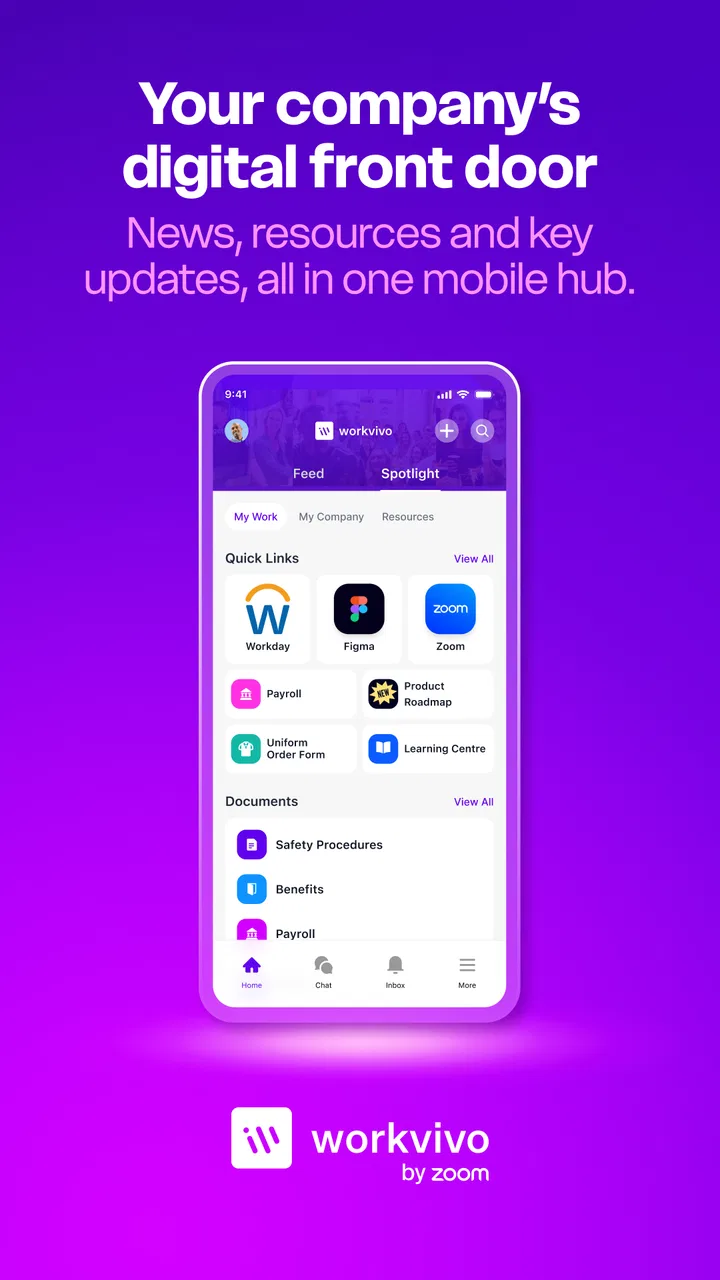
My overall impression is that Workvivo works best when treated as the front door to internal communication: a place where an update begins, colleagues add meaning, and the final result is directed into the proper business workflow. It is not the whole workplace system, and it should not pretend to be. Used with clear ownership and sensible boundaries, it can make a dispersed organization feel more connected and make important internal conversations easier to notice, join, and carry forward.
FAQs for Workvivo
01What is Workvivo and what does it do?
Workvivo is an employee engagement platform designed to enhance internal communication and foster a sense of community within organizations. It combines social networking features with traditional intranet capabilities, allowing employees to share updates, celebrate achievements, and connect with colleagues. The app aims to boost morale and improve workplace culture.
02Is Workvivo suitable for small businesses?
Yes, Workvivo is suitable for businesses of all sizes, including small enterprises. The platform is scalable and can be customized to fit the specific needs of a smaller team. It facilitates effective communication, which can be particularly beneficial for small businesses looking to enhance their internal culture and employee engagement.
03Can Workvivo integrate with other tools and platforms?
Workvivo offers integration capabilities with various tools and platforms commonly used within organizations. This includes popular productivity and communication tools like Slack, Microsoft Teams, and Zoom. These integrations help streamline workflow and ensure that Workvivo can be seamlessly incorporated into existing digital ecosystems.
04Is Workvivo secure for company use?
Security is a top priority for Workvivo. The platform uses robust encryption protocols to protect data and ensure secure communication. Additionally, it complies with industry standards and regulations. Companies can trust that their data and employee interactions are safeguarded, making it a reliable choice for internal use.
05How user-friendly is the Workvivo interface?
Workvivo is designed with user-friendliness in mind. Its intuitive interface allows users of all tech proficiency levels to navigate easily. The platform features straightforward navigation and a familiar social media-like experience, which helps employees quickly adapt, engage, and contribute without extensive training or onboarding.
Pros
- User-friendly interface
- easy to navigate.
- Integrates with existing enterprise tools.
- Real-time communication boosts engagement.
- Customizable features for diverse needs.
- Robust analytics for performance insights.
Cons
- Limited offline functionality.
- Notification settings need more options.
- Occasional sync issues with updates.
- Mobile app lacks some desktop features.
- Pricing can be high for small teams.

Workvivo
Gallery